 |
| Huawei Modem |
Save your money and time using Nokia PC Suite to connect to Internet with Huawei unlocked modem with all SIM-Card. Here the easy stem for you:
1. Insert unsupported SIM to your unlocked modem then plug in to your PC. The program will show the message of invalid SIM card, close thas message.
2. Open Nokia PC Suite on your PC or if no click
here for download.
3. In Nokia PC Suite, choose the option Connect to the Internet
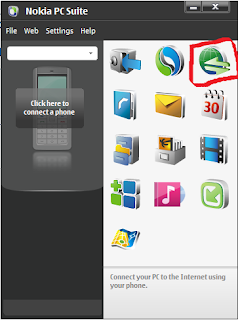 |
| Choose Connect to Internet |
4. Go to configure and choose your data card modem that connected to your PC.
After configured connect to the Internet as using with your Nokia phones.
 |
| Connected |
Thank for your visiting!
Computer/IT
,
Knowledge
,
Software
,


